What a Real DDoS Attack Looks Like: Lessons From a Live Incident
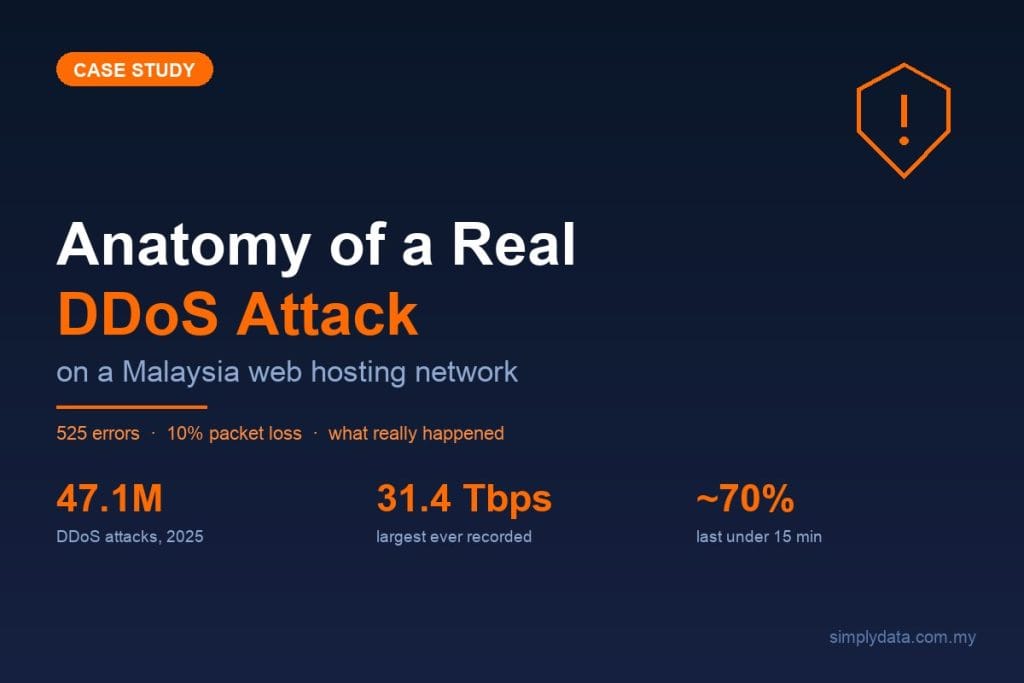
Over a weekend in early July 2026, a DDoS attack on our Malaysia web hosting provider knocked the Simply Data website into intermittent failure. Visitors saw a Cloudflare Error 525 “SSL handshake failed” on some page loads and Error 522 “connection timed out” on others. Pages that normally appear instantly took around 20 seconds to load, or failed outright. Strangest of all, it was inconsistent: the site worked perfectly for one person and broke for the next, with roughly one in three requests failing at the peak.
As a NACSA-licensed cybersecurity company, we treat our own infrastructure the way we treat a client’s. So we investigated it as an incident, gathered evidence, and traced it to root cause — and the failure was not where most people would first look. Here is what happened, why the site “looked fine” to some people while monitoring tools screamed, and what actually stops this kind of attack.
What we saw
The symptoms were textbook “something is wrong at the network edge,” not “the application is broken”:
- Intermittent 525 and 522 errors from Cloudflare, our CDN and web application firewall (WAF).
- Load times spiking to around 20 seconds, then timing out.
- Success and failure varying request-by-request — no clean pattern a normal user could reproduce on demand.
- Static content (logos, stylesheets, scripts) still appearing, while fresh dynamic pages stalled.
Two different error codes both pointing at the connection between the CDN and the origin server was the first clue. This was not a broken plugin or an expired certificate — something was interrupting the network path itself.
What actually happened
The root cause was a high-volume, adaptive DDoS (Distributed Denial-of-Service) attack against the network of our hosting provider, Shinjiru — not against the Simply Data website specifically. Shinjiru is a well-established Malaysian web hosting company, and like our own site, thousands of other Malaysian businesses run on its network. Shinjiru confirmed the attack publicly. On its status page and official LinkedIn, the company described a roughly 36-hour “Dynamic Multi-Vector DDoS attack” — combining UDP floods, TCP state-exhaustion, IP carpet bombing, and direct BGP-routing and Layer-3 attacks against ports including 80, 443 and 22 — and said the attackers “continuously shifted their strategy” to exploit the timing gaps between its filter-rule deployments.
We proved the distinction with evidence. Our own server was completely healthy the entire time: CPU sat near 0%, memory around 3%, and no resource limit was ever hit. The application was fine. What was broken was reachability — packets could not reliably travel across Shinjiru’s network edge, where we measured roughly 10% packet loss. And because every HTTPS connection needs several network round-trips to complete, even 10% packet loss cascades into a far higher request-failure rate — which is why, at the peak, roughly one in three page requests failed outright. The website was not overwhelmed; the road leading to it was flooded.
To understand why that produces a 525 or 522, picture a modern site as two parts: the CDN / WAF (Cloudflare) is the public “front door” that terminates HTTPS, filters bad traffic and serves cached content; the origin server is where the live website actually runs, inside Shinjiru’s hosting network.
Cloudflare has to reach back to the origin for anything not already cached. When the origin’s entire network is flooded, those requests are dropped or delayed on the way there. If the encrypted connection cannot complete, you get 525 (SSL handshake failed); if the origin cannot be reached in time, you get 522 (connection timed out). The front door was healthy and doing its job — it just could not get through to the house behind it.
This is the crucial nuance: a CDN protects you from attacks aimed at your website, but it cannot save you if the attack floods the whole network your origin server lives on. The origin was healthy; the network around it was not.
How the attack unfolded
Because we monitored the incident end to end and cross-checked it against Shinjiru’s public status updates, we can reconstruct the sequence — a useful anatomy of what a real, sustained DDoS looks like from the receiving end.
- Onset (a Saturday afternoon). Our error rate went from effectively zero to a steady stream of Cloudflare 525 and 522 errors within an hour. Cloudflare’s edge analytics later showed the failure rate climbing past 40%, and at its worst more than half of all requests to the site were failing.
- Provider confirmation. Shinjiru posted a status notice acknowledging “a network issue affecting connectivity across our subnets,” which it went on to describe as a complex, atypical “network anomaly” — an attack that “kept adapting” with new traffic signatures, targeting ports 80, 443 and 22.
- Partial recovery, then escalation. Shinjiru stabilised local (domestic Malaysia) routes first while international routes stayed degraded — and because Cloudflare reaches our origin over international paths, our site kept flapping even after local visitors saw improvement. The incident then escalated to what Shinjiru itself labelled a “Critical Infrastructure Disruption” affecting both local and international routing.
- What we measured. Throughout the event we recorded roughly 10% packet loss on the path to our origin, page loads stalling to around 20 seconds, and an error rate swinging between about 15% and 67% as the attack mutated and mitigations were re-tuned. Our own server never flinched: CPU near 0%, memory around 3%, no resource limit hit.
- Resolution — not in a straight line. After deploying layered filtering with its upstream network partners, Shinjiru moved the status to “Traffic Mitigated” and then “Resolved.” But the recovery was bumpy: the status page later flipped back to “Escalated Mitigation & Shifting Vectors” as the attack resurged, before connectivity finally held and our error rate returned to zero. Credit where it is due — Shinjiru communicated openly throughout, service was restored, and no customer data was ever at risk. This was an availability event, not a breach.
The single most important detail runs through every line above: at no point was the Simply Data website or server the problem. Every symptom traced to the network path into the hosting environment — which is exactly why the defensive lessons below focus on the network, not the application.
Why the site looked fine to some people
This is the part most business owners find surprising, so it is worth being honest about.
While our monitoring flagged a serious problem, plenty of people browsing the site barely noticed. Three things explain that gap:
- Caching. Cached static assets (CSS, JavaScript, images) kept loading straight from the CDN edge, which was never under attack. Pages looked “mostly there.”
- Partial success. Roughly 65% of requests still got through. If your first click landed in that majority, the site felt normal.
- Silent browser retries. Browsers automatically retry a failed or slow connection. A request that quietly succeeded on the second attempt just felt like “a bit slow today,” not an outage.
Meanwhile, a fresh crawler — in our case an Ahrefs Site Audit run — hit a large batch of uncached, dynamic URLs in quick succession. With no cache to fall back on and no human patience to absorb retries, it recorded the timeouts faithfully and reported the site as broken.
Both observations were correct. Casual browsing understated the problem; automated monitoring caught the truth. That is exactly why you cannot rely on “it looks fine when I check it” as your monitoring strategy.
Why manual defences struggle — and the key lesson
Like most providers facing a fast-moving flood, Shinjiru’s first line of defence was rule-based blocking — access-control lists (ACLs) that drop traffic from offending sources as they are identified, deployed together with its upstream network partners. This is the standard industry response, and it did eventually bring the attack under control. But the incident illustrates a structural challenge that applies to everyone, not to any one provider: when an attack keeps mutating — new sources, new signatures, new vectors — each manually written block is already out of date by the time it is applied. That is why the disruption arrived in waves rather than ending cleanly.
The lesson is blunt, and it drives everything below: static, manual blocklists lose to an adaptive, multi-vector DDoS. By the time a human writes a rule, the attack has changed shape. What wins is automated, behavioural or machine-learning-based mitigation, backed by large upstream scrubbing capacity and fast detection.
Why shared hosting spreads the damage
Here is the detail that turns this from a hosting outage into a lesson: on shared, multi-tenant hosting, you do not have to be the target to become a victim. A DDoS attack is often aimed at one specific customer or a narrow block of IP addresses — but the defences a provider throws up to stop it are blunt by necessity. Null-routing, rate-limiting and broad traffic filters are applied at the network or transit layer, so they land on everyone sharing that infrastructure, not just the intended target. When attackers deliberately spread traffic across a whole subnet — a technique known as “carpet bombing” — the provider ends up filtering an entire range of addresses, and every site on it feels the hit.
That is the trade-off baked into cost-efficient shared hosting: density over isolation. Packing many tenants onto the same IP ranges and network paths keeps prices low, but it also means one neighbour’s bad day becomes yours. Our own site was never the target of this attack — yet it flickered for the better part of two days because it sat on the same network that was under fire and being defended.
The takeaway is not “shared hosting is bad” — it is the right fit for plenty of workloads. The takeaway is that if a website is business-critical, its blast radius matters. A site that cannot afford a weekend of intermittent downtime should not share its fate with thousands of unknown neighbours.
How often do DDoS attacks happen?
Often, and it is accelerating.
Globally, Cloudflare reported mitigating 47.1 million DDoS attacks in 2025, up 121% year-over-year (Cloudflare 2025 Q4 DDoS Threat Report). Network-layer attacks — the kind that hit our provider — tripled from 11.4 million in 2024 to 34.4 million in 2025 (Cloudflare 2025 Q4). The largest single attack ever recorded reached 31.4 Tbps and lasted just 35 seconds (Cloudflare 2025 Q4).
That speed matters. According to NETSCOUT (2025), around 70% of DDoS attacks last under 15 minutes, and only about 10.7% last longer than an hour. An attack that is over in minutes is an attack a human team cannot realistically block by hand — the entire event can begin and end before someone finishes writing a firewall rule. Automation is not a luxury here; it is the only response fast enough.
The regional picture is worse. StormWall’s State of DDoS Attacks in APAC 2025 recorded APAC attacks up 106% year-over-year — 4.2 million in 2025 versus 2.04 million in 2024 — with adaptive, multi-vector attacks up 83% year-over-year in the region. Notably, StormWall’s data also indicates Malaysia’s share of APAC attack volume rose sharply in 2025 — a signal, if not a precise figure, that local exposure is climbing. And the single most-targeted sector? Telecommunications, service providers and carriers (Cloudflare 2025 Q4) — the infrastructure and hosting layer itself. In other words, exactly what happened to us is exactly what the data says to expect: the hosting layer is the target.
One honest caveat for local context. Malaysia’s MyCERT logged only 2 “Denial of Service” incidents to Cyber999 in Q4 2025, out of 1,881 total (MyCERT Cyber Incident Quarterly Summary, Q4 2025). That is not because DDoS is rare here — the global and APAC numbers make that clear. It is because DDoS is absorbed at the ISP and hosting layer and rarely gets formally reported by the end business. The attacks are happening; they just do not usually reach a national incident tally.
Other attacks you should know about
DDoS is a disruption attack — it is loud but usually does not steal data. It helps to see where it sits among the threats Malaysian organisations actually face. For scale, MyCERT’s Q4 2025 breakdown of reported incidents was:
- Fraud — 78.2% (phishing, scams, business email compromise / BEC)
- Data Breach — 9.1% (exposed or stolen data)
- Intrusion — 5.4% (unauthorised access, often via web application flaws)
- Malicious Code — 2.1% (ransomware and other malware)
(MyCERT Cyber Incident Quarterly Summary, Q4 2025.)
The practical takeaway: fraud and phishing dominate by volume, ransomware and intrusions do the most direct damage, and web application attacks are a constant background risk. DDoS is the one that takes you offline. A serious defence has to account for all of them, not just the noisy one.
How to defend against a DDoS attack
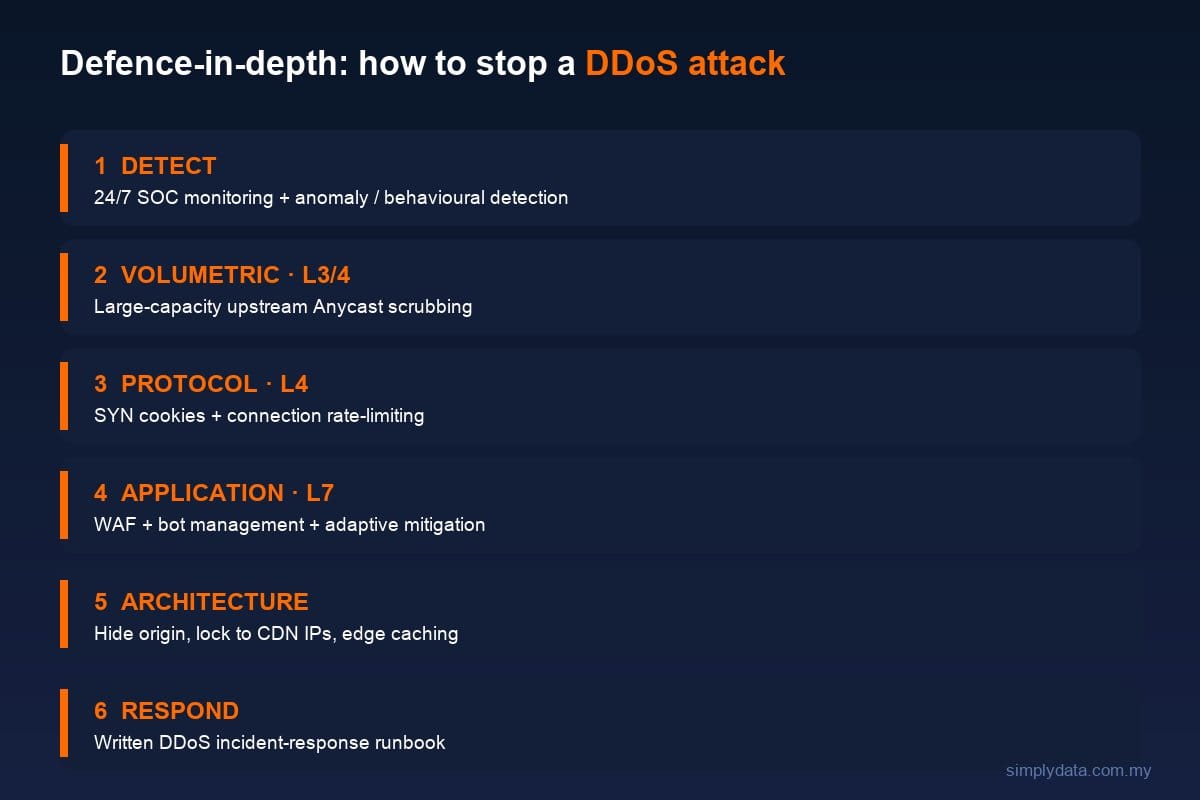
Defence against DDoS — and against downtime generally — is defence-in-depth. No single product is enough. Here is how the layers fit together, mapped to what our incident actually taught us.
Detect. You cannot respond to what you cannot see. 24/7 SOC monitoring with anomaly and behavioural detection is what turns “the site feels slow” into “we are under a network-layer attack, here is the packet loss.” Fast, accurate detection is the difference between a minutes-long blip and a weekend-long outage.
Volumetric attacks (Layer 3/4). Flood traffic has to be soaked up upstream, before it reaches your network, using large-capacity Anycast scrubbing that spreads and absorbs the load across many locations before it can saturate any single network edge.
Protocol attacks (Layer 4). SYN cookies and connection rate-limiting defend against attacks that exhaust connection state rather than raw bandwidth.
Application attacks (Layer 7). A WAF, request rate-limiting, bot management, and — most importantly — adaptive, behavioural mitigation that learns normal traffic and reacts automatically. This is the direct answer to the “mutating” attack that beat manual ACLs: the defence has to adapt as fast as the attacker.
Architecture. Design for resilience: hide your origin behind the CDN (never expose its IP), lock the origin firewall to accept traffic only from the CDN’s IP ranges, choose hosting with genuine network-layer DDoS protection, and lean on edge caching and “always-online” features so cached content keeps serving even when the origin is briefly unreachable. Good architecture is what kept most of our pages partially available.
Respond. Have a written DDoS incident-response runbook before you need it: who declares the incident, how you confirm origin health versus network health, who talks to the hosting provider, and what “recovered” looks like. Having a clear method to separate a healthy origin from a flooded network is what let us find the true cause in minutes instead of chasing the wrong fixes.
If you take one thing from the layers above: automated and adaptive beats manual every time. An attack that mutates by the minute and is often over within 15 will always outrun a human editing blocklists.
If you are on shared hosting, protect yourself
You cannot fix your provider’s network — but you can shrink your exposure to the next incident. Practical steps for any Malaysian business on shared or multi-tenant hosting:
- Front your site with an independent CDN/WAF (such as Cloudflare) so cached content keeps serving and attack traffic is absorbed at the edge — and confirm caching is actually configured, not merely switched on.
- Monitor your provider’s health independently. Do not learn about an outage from a customer. External uptime and network monitoring tells you within minutes whether the fault is your site or the network beneath it.
- Isolate what is critical. For revenue- or reputation-critical sites, consider a dedicated IP, a dedicated or isolated hosting tier, or a cloud host with genuine network-layer DDoS protection — so you are not sharing a blast radius with unknown neighbours.
- Be cautious around your provider’s promotions. New-signup surges can cluster fresh accounts onto the same IP ranges; ask where your site sits and whether higher-tier protection is available.
- Demand transparency and SLAs. Choose providers that publish incident status openly and offer tiered DDoS protection with explicit guarantees — then read what those guarantees actually cover.
Knowing whether your hosting would survive an attack like this — and having a plan for when it does not — is exactly what a 24/7 SOC and a tested incident-response process are built for.
The takeaway for Malaysian businesses
Our site came back, our data was never at risk, and our origin server never so much as broke a sweat. But the episode was a clean, real reminder that in 2026 your uptime depends on the network your site lives on — not just your site — and that the winning defences are the automated, always-on ones.
This is the work Simply Data does for clients every day: detection through a 24/7 SOC, adaptive mitigation rather than manual firefighting, and a tested incident-response process for when something does slip through. We are a NACSA-licensed Managed SOC and MDR provider, we also run penetration testing to find weaknesses before attackers do, and our SOC work was recognised as “Cyber Security Project of the Year” at the Malaysia Cyber Security Awards 2025 — credibility we earned by handling exactly these situations, including our own.
If your business has never asked “what actually happens if our website’s hosting network gets attacked?”, now is a good time to find out — before an attacker asks it for you.
Frequently asked questions
Was Shinjiru hit by a DDoS attack?
Yes. In early July 2026, the Malaysian web hosting provider Shinjiru confirmed on its status page and official LinkedIn that its network was hit by a roughly 36-hour “Dynamic Multi-Vector DDoS attack.” The attack targeted Shinjiru’s network rather than individual customer websites — but because many sites share that infrastructure, hosted sites (including our own) saw intermittent Cloudflare 525 and 522 errors until the traffic was mitigated.
Is a 525 error a hack?
Not usually. A 525 (“SSL handshake failed”) means your CDN could not complete a secure connection to your origin server. It often points to a certificate or configuration issue — but as our incident showed, it can also mean the origin’s network is flooded or unreachable. It signals a connectivity problem to investigate, not automatically a breach of your data.
Can a small business be hit by a DDoS attack?
Yes. Attackers frequently target the shared hosting and network infrastructure that many small businesses sit on, so you can suffer downtime even when you were never the intended target. With APAC DDoS attacks up 106% year-over-year (StormWall, 2025), no business is too small to be caught in the blast radius.
Does Cloudflare (or any CDN) alone stop every DDoS?
No. A CDN/WAF is excellent at protecting your website from attacks aimed at it, and it should be part of your defence. But if the attack floods the entire network your origin server lives on, the CDN can no longer reach the origin — producing exactly the 522/525 errors we experienced. You also need network-layer protection and capable hosting behind it.
How long do DDoS attacks last?
Most are short and sharp. NETSCOUT (2025) found around 70% of DDoS attacks last under 15 minutes, and only about 10.7% run longer than an hour. That brevity is precisely why automated mitigation matters — a human cannot write blocking rules faster than a minutes-long attack can end and change shape.
What should I do if my website goes down like this?
First, separate application health from network health: check whether your server itself is healthy (CPU, memory, error logs) versus whether the network path to it is failing. Contact your hosting provider and check its status page for an active incident. Confirm your CDN is configured to keep serving cached content. Then log everything and review your DDoS incident-response plan — and if you do not have one, that is the real fix to prioritise afterwards.
Talk to us
If you would like a straightforward assessment of how your website and hosting would hold up under an attack like this — and what 24/7 SOC monitoring, adaptive mitigation, and a proper incident-response runbook would look like for your organisation — contact Simply Data for a free consultation. We are happy to walk you through it.
Sources
- Cloudflare 2025 Q4 DDoS Threat Report
- NETSCOUT DDoS Threat Intelligence Report (2025)
- StormWall — State of DDoS Attacks in APAC 2025
- MyCERT Cyber Incident Quarterly Summary, Q4 2025
- Shinjiru — Dynamic Network Disruption incident status updates, July 2026 (status page · archived copy)