
PHP2Shell: What Malaysian Businesses Should Patch, Test and Monitor
PHP2Shell is a pair of critical flaws in the PHP runtime itself. For PHP2Shell Malaysia risk, that means three layers: patch PHP to a fixed release and confirm live workers run it, use VAPT to find exposed hosts and retest fixes, and use SOC monitoring to investigate suspicious behaviour. This Simply Data briefing explains where each layer stops.
This briefing is for Malaysian IT managers, CIOs and business owners who run PHP on websites, portals or internal applications. We reviewed the facts up to 26 October 2026 (Malaysia time). Check the linked official sources for anything published after that date.
What is PHP2Shell and what changed in October 2026?
PHP2Shell is the name used for two critical remote code execution flaws in the PHP runtime. An attacker does not need to log in to use them. The PHP project disclosed both on 21 October 2026. The flaws are in PHP itself, not in a plugin, so every PHP installation that serves web requests through an affected server integration needs attention.
The PHP project announcement lists two flaws. CVE-2026-109618 is an out-of-memory corruption issue. CVE-2026-109619 is a stale global state issue. The fixed releases are PHP 8.5.12, 8.4.27, 8.3.36 and 8.2.35.
PHP says the highest demonstrated risk is on Apache mod_php. Do not assume PHP-FPM is exempt. Updating a WordPress plugin, theme or framework does not fix the runtime underneath it.
Amazon Threat Intelligence reported attempts to exploit these flaws against its MadPot honeypot sensors as early as 17 October, before the public disclosure. It also said it had not established whether such attempts succeed against real-world systems. Treat this as a reason to act quickly, not as proof that any particular organisation has been compromised.
Fortinet published its own PHP2Shell explainer on 23 October. It is useful background, but updating firewall firmware does not change the PHP version on your web servers.
What does the PHP2Shell Malaysia advisory ask organisations to do?
NACSA published a Malaysian advisory through NC4 on 21 October 2026. It urges organisations to patch PHP, check which services are actually running, monitor for suspicious activity and carry out vulnerability assessments. It is a national prompt to act on internet-facing PHP systems. It does not report a confirmed Malaysian incident.
The NACSA advisory does not describe any confirmed local compromise. That does not prove there has been none. Base your own judgement on your own inventory and logs, not on the absence of public reports.
The advisory also gives you a dated, official reference for emergency change approvals and management updates. Use it to explain why patching cannot wait for the next quarterly maintenance window.
The advisory’s actions fall into three parts, and each solves a different problem. Patching removes the known flaw. VAPT shows where exposure remains and whether your fixes actually hold. SOC monitoring looks for signs that something went wrong before or during patching.
How should you patch and verify PHP runtimes?
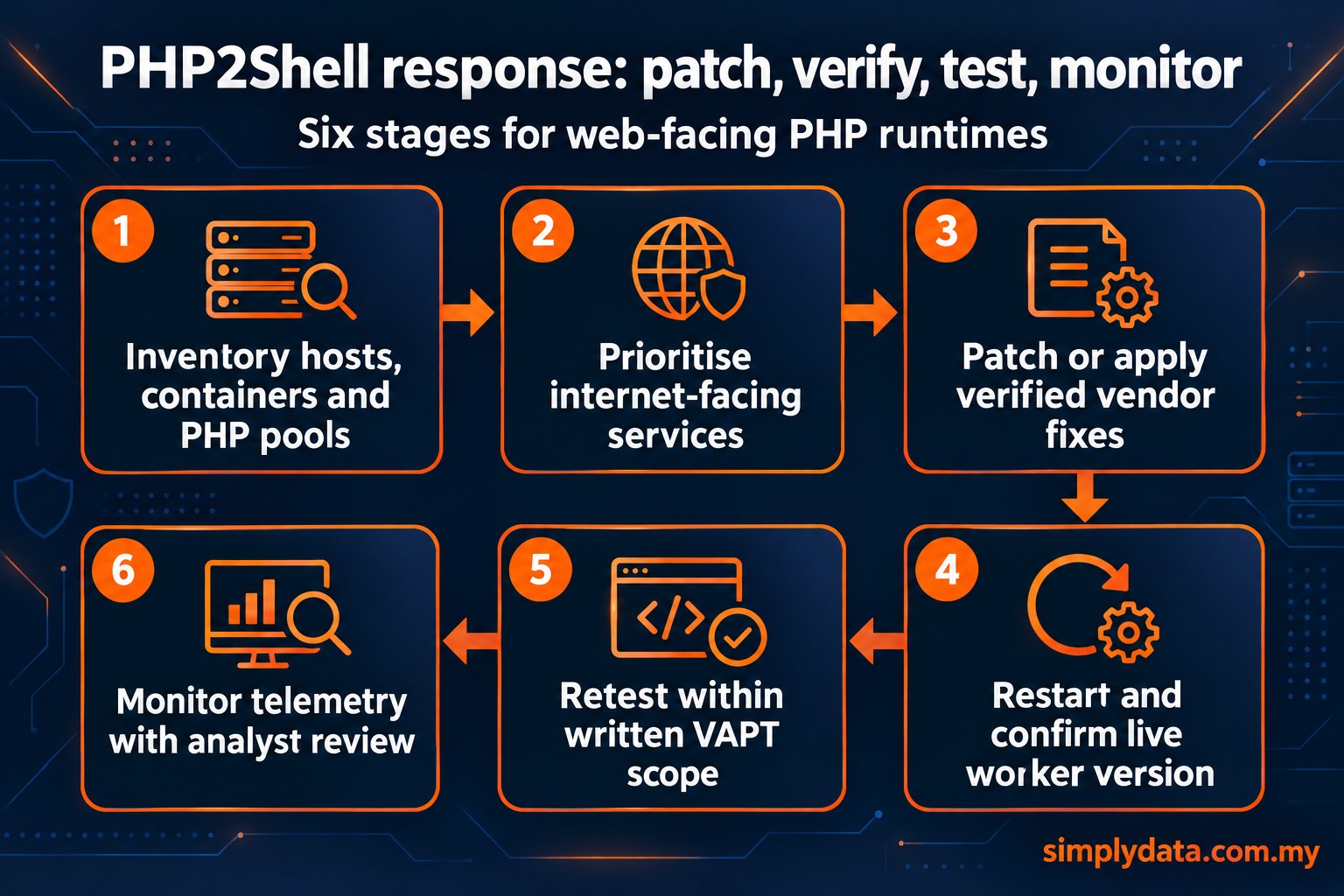
Move every web-facing PHP runtime to a fixed release on a supported branch, or to a vendor build that you have confirmed contains the fixes. Then restart the workers and check the version they are actually running. If an updated package has not reached the live worker processes, the exposure is still there.
The six-stage diagram in this section is a planning sequence. Monitoring is listed last, but it runs throughout, from inventory to retest.
PHP 8.1 and older no longer get routine upstream updates. PHP did supply minimal source backports for 7.4, 8.0 and 8.1, and some Linux distributions add fixes to older package versions. Ask your vendor for evidence that the fix is included. A version banner alone does not settle the question, because a distribution backport can keep the old version number. Where you can, upgrade to a supported branch.
Patch-and-verify checklist
- List every host, container image and PHP-FPM pool that serves web requests. Include staging servers and forgotten admin portals.
- Map every reachable upload route, such as forms, file managers and API endpoints that accept multipart data.
- Patch internet-facing services first. Then patch internal systems that users, partners or VPN connections can reach.
- Apply the fixed release or a confirmed vendor fix. For containers, rebuild the images instead of patching running containers.
- Restart PHP workers and web servers. Confirm the version reported by the live worker, not just by the package manager.
- Record what changed, when and who approved it, so that testers and SOC analysts can match their evidence to your timeline.
- Arrange a retest within a written scope once remediation is complete.
Shared hosting and managed platforms need the same check. Ask your provider which PHP build is running and when it was restarted. Do not assume that an automatic update has already taken effect.
Can a WAF or temporary settings protect you while you patch?
A web application firewall (WAF) can reduce risk while you schedule patches. It is a temporary control, not a replacement for a fixed PHP runtime. AWS, for example, published WAF mitigation guidance for PHP2Shell as a way to reduce risk during the patching window.
A WAF inspects HTTP requests that pass through its inspection point; it does not inspect PHP worker memory. Its protection depends on its placement, configuration, inspection capabilities and rule versions. Direct access to an origin server can bypass an edge WAF unless other controls restrict or inspect that traffic.
Some temporary mitigations involve changing PHP runtime settings. Handle these through change control. Read the full vendor guidance, test in staging and understand the effect on availability. In particular, do not remove PHP memory limits as a quick copy-and-paste fix. Without a limit, one request can use up a server’s resources, so consider this only with the full official mitigation context. Patching should stay the priority.
What about CVE-2026-115560 and the 23 October notice?
On 23 October 2026, PHP published a notice about a separate follow-up issue, CVE-2026-115560. It recommends keeping session.upload_progress.enabled=0 in place until the next regular bugfix release. This does not mean the two original fixes failed, or that every patched server can still be exploited.
According to the PHP notice, the follow-up is an additional remote code execution risk in an unlikely configuration. It requires an unusual runtime switch of the session serializer while upload progress is enabled. PHP plans to publish the full advisory with that next regular release. This article does not identify a fixed release for this third issue.
Check the configuration before you rely on this setting. Some applications use upload progress tracking, for example to show progress bars for large uploads, so test the change first. Apply it in the configuration that the web server actually uses, such as the PHP-FPM pool or Apache settings. The command-line PHP can read a different ini file. After restarting, confirm the effective value from the running web process. Review the setting again when the next regular release arrives.
What should a SOC watch for during and after patching?
A security operations centre (SOC) should look for signs that a PHP server was abused before or during patching. These include suspicious uploads, PHP worker crashes or restarts, unexpected child processes, unexpected file changes and unusual outbound traffic. What the SOC can see depends on the telemetry you collect, and analysts must judge each signal in context.
Each telemetry source only helps if you collect it and configure it properly:
- Reverse proxy or WAF logs: can show multipart request detail, but only if request inspection is safely configured with privacy controls. Standard access logs usually leave out request bodies and form fields.
- Web server and application logs: show request paths, status codes and spikes in errors.
- PHP and system logs: show worker errors, crashes and restarts.
- Endpoint detection and response (EDR) on the host: shows processes started by PHP workers and file changes in web and temporary directories. Access logs do not provide this.
- DNS and network logs: show unexpected outbound connections from web servers.
These are example ideas for correlating events. They are not detection signatures already deployed in any environment. Legitimate uploads fail, and workers restart after deployments. One signal rarely proves a compromise. Correlated signals, reviewed by a human analyst, give a much stronger basis for a decision.
Remote code execution may not leave a web shell behind, so finding no web shell does not mean the server is clean. If signs point to compromise, preserve the evidence before you rebuild and escalate to incident response. Do not block IP addresses wholesale because they appear in threat reports. Shared anonymisation addresses are leads, not proof.
At Simply Data, the 24×7 Security Operations Centre works with the SD Unified Platform. Machine-learning detections in the SIEM start multi-layer AI investigation workflows. These check an in-house knowledge base and an in-house threat intelligence database of indicators of compromise (IoCs).
AI-drafted investigation packs then support analyst investigation and threat hunting. Every AI decision is logged and can be retrieved for audit, and analysts own and spot-check the rules the AI uses. You can read more about this agentic AI SOC approach.
Coverage of a scenario such as PHP2Shell still depends on which web, endpoint and network data a customer sends to the SOC.
How does VAPT help, and where does it stop?
Vulnerability assessment and penetration testing (VAPT) reduces PHP2Shell risk early. It finds exposed PHP services, checks configuration against the advisories and confirms through retesting that fixes are live. It is a point-in-time assessment, so it cannot guarantee protection against unknown zero-days, later configuration changes or future compromise.
For this advisory, useful VAPT work includes:
- an authenticated inventory and configuration review against the official advisories
- external discovery of forgotten hosts
- checks on network segmentation and least privilege, so that a compromised web server cannot easily reach databases or admin networks
- a retest once remediation is complete
Keep all testing within a written scope and agreed rules of engagement. No one should attempt exploits against production systems without explicit testing authority. Safe version and configuration checks are usually the right place to start. The value comes when you fix the findings and retest them.
Simply Data Sdn. Bhd. holds NACSA licences under the Cyber Security Act 2024 for managed SOC monitoring and penetration testing. We can help you scope a penetration test for your PHP estate, or plan which web, EDR and network telemetry to send to managed SOC monitoring. To start, contact the team with your approximate host count and hosting model.
Frequently asked questions
Is PHP2Shell a WordPress plugin problem?
No. PHP2Shell affects the PHP runtime itself, not a specific plugin or theme. Any PHP installation serving web requests through an affected server integration needs a fixed release or a verified vendor fix, even if every plugin is up to date.
Which PHP versions fix PHP2Shell?
The PHP project named 8.5.12, 8.4.27, 8.3.36 and 8.2.35 as fixed releases for CVE-2026-109618 and CVE-2026-109619. For older branches, ask your vendor for evidence of a backported fix. A version banner alone is not conclusive.
Does disabling session upload progress replace patching?
No. PHP recommends keeping session.upload_progress.enabled=0 for a separate follow-up issue, CVE-2026-115560, until its next regular bugfix release. It is a configuration safeguard alongside the fixed releases, not a substitute for them. Test it first, because some applications rely on upload progress.
Has PHP2Shell been exploited in Malaysia?
The NACSA advisory dated 21 October 2026 does not report a confirmed Malaysian incident. That does not prove none occurred. Amazon reported exploitation attempts against its honeypots from 17 October, so organisations should check their own systems and logs.
Can a SOC guarantee it will detect PHP2Shell exploitation?
No. A SOC can investigate behavioural signs such as worker crashes, unexpected processes, file changes and outbound traffic. What it can see depends on the telemetry collected, and human analysts must interpret the signals. Patching remains essential.