
SDP-Portal is the customer-facing surface of SD Unified Platform. It is the answer to “what is my SOC actually doing for me?” Per-tenant MTTD and MTTR dashboards, compliance evidence on demand, ticket lifecycle visibility, real-time monitoring access, and role-aware access for customer admins, compliance officers, and operational staff. Operated under NACSA SOC Licence 20007-01.
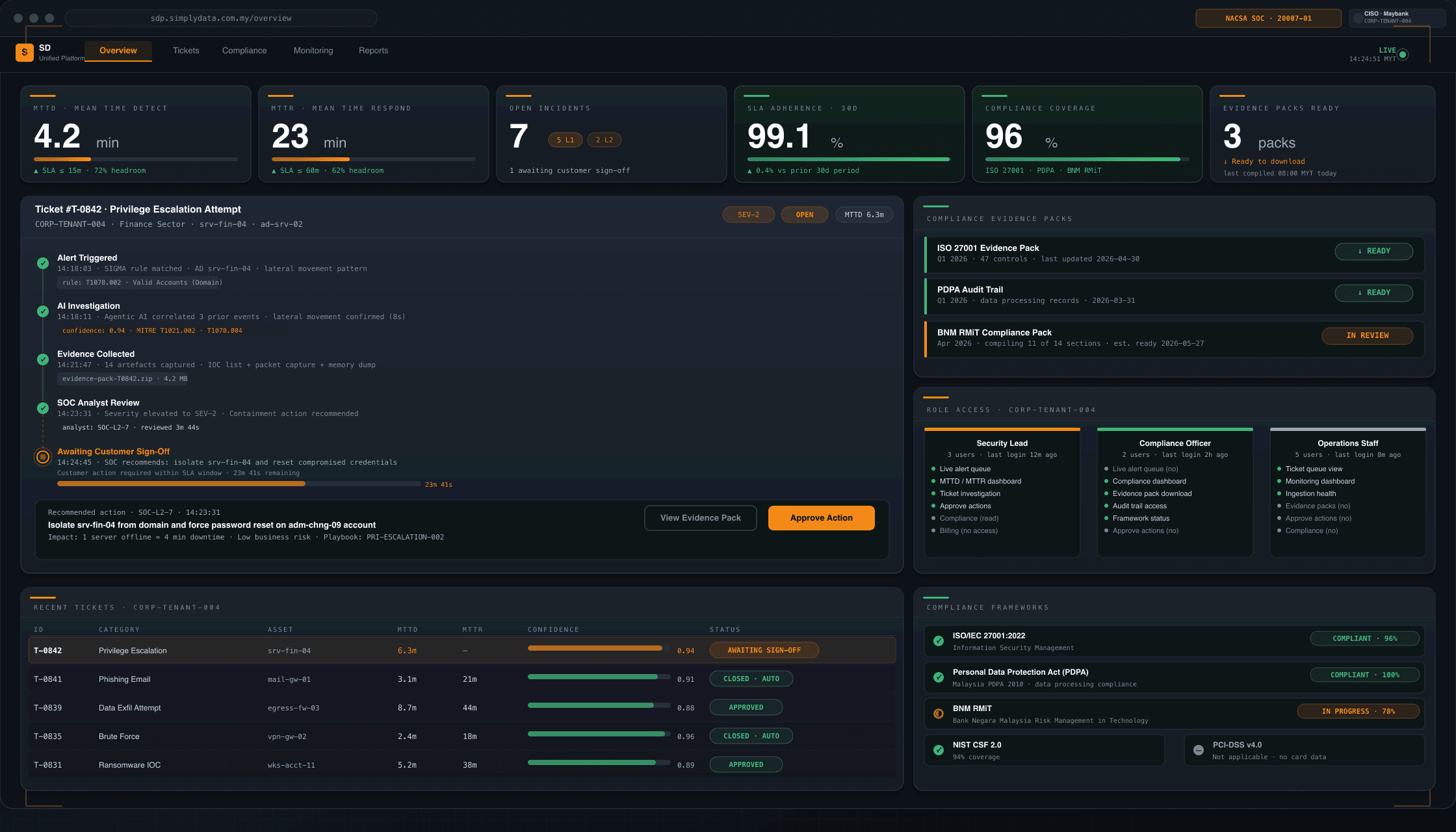
Customer self-service portal
The hardest question a managed SOC has to answer is also the simplest: “what are you actually doing for me?”
Traditional MSSPs answer this with a monthly PDF report and a help-desk ticket queue. The customer waits 30 days to see whether the SOC is earning its retainer.
SDP-Portal answers it in real time. Customers log in and see — at a glance — their MTTD and MTTR trends, the live alert queue, every open and closed ticket with full AI investigation packet attached, ingestion health across every endpoint, and compliance evidence packs ready to download.
The portal is built for three primary roles:
- Customer security lead. Sees the operational picture: alert volume, automation coverage, MTTD/MTTR, current open incidents.
- Compliance officer. Sees evidence packs, audit logs, control coverage maps for PCI-DSS, BNM RMiT, ISO 27001, NIST CSF, PDPA, and CSA 854.
- Operational staff. Sees the tickets relevant to their scope — endpoint, network, identity — with timeline and resolution status.
Each role sees a tailored surface. Role assignment is managed by the customer admin, audited by Simply Data RBAC (role-based access control) reconciler, and locked to tenant scope.
Per-tenant MTTD/MTTR dashboards
MTTD (Mean Time to Detect) and MTTR (Mean Time to Resolve) are the two metrics every regulator, auditor, and board member asks about. SDP-Portal surfaces both with per-tenant precision, drawn directly from the ticketing source of truth.
- MTTD trend. Rolling 30-day, 90-day, and YTD trends. Drill into individual incident detection times. Compare against industry benchmarks (where available).
- MTTR trend. Rolling 30-day, 90-day, and YTD. Broken out by severity tier — Critical, High, Medium, Low.
- Per-source breakdown. Which detection sources are driving the fastest detections? Where are the lag points?
- Per-severity breakdown. Critical-severity MTTR — usually the SLA-bound metric for regulated customers — surfaced as a dedicated tile.
For BNM-regulated FIs facing 14-hour incident reporting windows, MTTD and MTTR are not vanity metrics — they are evidence chain. SDP-Portal makes them downloadable for board reports and regulator submissions.
Compliance evidence on-tap
The compliance evidence pipeline is one of SDP load-bearing differentiators. SDP automatically collects evidence as part of the operational workflow — threshold-CSV ingestion records, alert investigation logs, control attestation records — and rolls them up into framework-keyed evidence packs.
Frameworks covered:
- PCI-DSS v4.0.1 — for FIs, payment processors, retailers handling card data
- BNM RMiT — for Malaysian FIs under Bank Negara Malaysia risk management in technology guidelines
- ISO 27001:2022 — international ISMS standard
- NIST CSF 2.0 — US-origin cybersecurity framework, widely adopted internationally
- PDPA (Malaysia) — Personal Data Protection Act compliance evidence
- CSA 854 — Cyber Security Act 2024 obligations
Customers download evidence packs directly from the portal — no help-desk ticket, no email-attachment chase, no “I need this by Friday” panic at audit time.
Ticket lifecycle visibility
Every ticket touched by the SDP SOC team — whether AI-triaged, AI-investigated, or human-driven — is visible to the customer in real time.
Each ticket shows:
- Status. Open, Acknowledged, In Investigation, Resolved, Closed (with reason).
- Timeline. Every state transition timestamped. Every analyst (or AI agent) touch recorded.
- AI investigation packet. Where AI drafted the investigation, the packet is attached: narrative, evidence, IoC (Indicators of Compromise) list, MITRE ATT&CK technique mapping.
- Analyst notes. Where human analysts added context, the notes are visible (subject to PII redaction policy).
- Resolution evidence. Final actions taken, IoCs blocked, hosts isolated, controls applied.
Customer admins can search and filter the full ticket history. Compliance officers can export ticket sets for audit submissions. Operational staff can subscribe to ticket-status changes via the integrations layer.
Real-time monitoring access
SDP-Portal exposes the SD Monitoring layer directly to customers. Customers see:
- Per-endpoint ingestion status. Is the EDR (Endpoint Detection & Response) agent reporting? When was the last heartbeat? Is volume within expected bounds?
- Source coverage map. Which sources are ingesting (Trend Micro, Palo Alto, Fortinet, Elastic, Microsoft 365, Zoho, etc.)? Which are degraded? Which are offline?
- Live alert queue. Current alert volume by severity. Critical-tier alerts surfaced as priority tiles.
- Automation coverage. Percentage of alerts triaged automatically vs. handled manually.
For customers used to waiting on a monthly report, the shift to real-time visibility is the most striking feature of SDP-Portal. The SOC is not a black box; it is a dashboard.
Role-aware access control
SDP-Portal RBAC is reconciled against a YAML role definition with audit trail. Customer admins assign internal staff to roles; Simply Data engineering team audits the reconciler nightly.
Standard roles:
| Role | Surface visible |
|---|---|
| Customer Admin | Full tenant surface + user management |
| Security Lead | Operational dashboards, tickets, monitoring, alerts |
| Compliance Officer | Evidence packs, audit logs, control coverage |
| Operational Staff | Scope-limited tickets (e.g. endpoint-only or identity-only) |
| Read-Only Auditor | Read access to dashboards + evidence (no ticket actions) |
Custom roles are available for customers with non-standard organisational structures (e.g. group-FI consolidated security functions or government inter-agency arrangements).
Why a customer portal matters (the procurement view)
When a security buyer is evaluating an MSSP, the portal is the single most-tested artefact. Procurement committees ask three questions:
- Can I see what the SOC is doing for me, in real time? If the answer is “you will see a monthly PDF report,” the buyer is buying a black box. SDP-Portal answers this question with a live operational dashboard.
- Can I retrieve audit evidence when a regulator asks? If the answer is “we’ll prepare a pack within 5 working days,” the buyer cannot meet a BNM RMiT 14-hour incident reporting window or a PDPA Section 12B breach notification window. SDP-Portal answers this with on-demand compliance evidence packs.
- Can my compliance officer, security lead, and operational staff each see what they need without seeing what they shouldn’t? If the answer is “we’ll set you up with a single shared login,” the buyer has a segregation-of-duties problem. SDP-Portal answers this with role-aware access.
SDP-Portal is engineered to win these three procurement questions on the demo, not on the paper response.
What is not in SDP-Portal (deliberately)
Being explicit about scope:
- No customer-driven response actions. Hash blocking, host isolation, and other response actions are operated by the Simply Data SOC team — not by customer staff through the portal. This is a deliberate trust-and-safety choice; customers can request response actions through tickets, and the SOC team executes with audit trail.
- No model selection. Customers do not pick the AI model used for triage or hunting through the portal. Model selection is centrally controlled and customers can request whitelisting on a per-tenant basis through their account manager.
- No prompt-engineering surface. Customers do not write or modify SDP AI prompts through the portal. Prompt engineering is operated by Simply Data SOC engineering team with full audit trail.
These boundaries protect customers from “I clicked the wrong button” outcomes and protect the audit chain.
Onboarding to SDP-Portal
Customer onboarding to SDP-Portal is operated by the Simply Data customer-success team. The standard onboarding sequence is:
- Tenant provisioning. Customer tenant is created in SDP with appropriate naming, RBAC defaults, and integration-source allowlist.
- Source ingestion configuration. Customer telemetry sources (Trend Micro, Palo Alto, Fortinet, Elastic, Microsoft 365, Zoho, custom sources) are configured for ingestion.
- User provisioning. Customer admin user is provisioned, with the ability to provision additional users in standard or custom roles.
- Compliance pack activation. Compliance evidence pipelines (PCI-DSS, BNM RMiT, ISO 27001, NIST CSF, PDPA, CSA 854) are activated as relevant.
- Customer walk-through. A live walk-through is delivered to customer admins, security leads, compliance officers, and operational staff.
- First hunt + first evidence pull. Customer drives a guided first hunt and a guided first evidence-pack download to confirm operational readiness.
Standard onboarding time-to-value is 5-10 business days, depending on the complexity of the customer source estate.
Why Customers Choose Simply Data SDP-Portal
Six outcomes that matter to procurement, compliance, and operations teams.
SLA Evidence That Procurement Trusts
Hard MTTD/MTTR numbers replace anecdotal “we caught some stuff” claims. Customers walk into board reviews with screenshots.
Audit-Ready in Minutes, Not Days
Compliance officers self-serve evidence packs (PCI-DSS, BNM RMiT, ISO 27001, NIST CSF, PDPA, CSA 854). No analyst tickets, no waiting.
No Black-Box Tickets
Every customer-facing ticket includes the AI investigation packet — narrative, evidence, model version, prompt hash. Customers see exactly how a conclusion was reached.
Multi-Tenant Isolation by Default
Tenant scope enforced at every query. Customer data, tickets, and evidence never cross-contaminate.
Three Personas, One Surface
Admins see operations, compliance officers see evidence, operational staff see tickets — same portal, different views.
Procurement-Ready for Regulated Buyers
BNM-regulated FIs, PDPA data controllers, and government agencies get the visibility they need without raising tickets.
Frequently Asked Questions
What is SDP-Portal?▾
SDP-Portal is the customer-facing surface of SD Unified Platform. It is the dashboard, ticket queue, compliance evidence pipeline, and real-time monitoring view.
Who can access SDP-Portal?▾
Existing Simply Data SOC customers gain progressive access from 23 June 2026 onward.
What compliance evidence can I download?▾
PCI-DSS v4.0.1, BNM RMiT, ISO 27001:2022, NIST CSF 2.0, PDPA, and CSA 854 evidence packs.
How are MTTD and MTTR calculated?▾
Drawn directly from the ticketing source of truth. Per-tenant, per-severity, with 30-day rolling averages.
Can I see the AI investigation packet?▾
Yes. Every customer-facing ticket has the AI investigation packet attached.
Is SDP-Portal multi-tenant (isolated per client)?▾
Yes. Multi-tenant by design.
What authentication does SDP-Portal use?▾
Single sign-on with optional MFA. Role-based access control enforced from the first request.
Is SDP-Portal available for non-SOC customers?▾
SDP-Portal is bundled with SDP SOC Managed Service. Standalone access for non-SOC customers is on the 2026 roadmap.
Other SDP Modules
Explore the rest of SD Unified Platform.
Get Your Free Consultation Now!
We’re here to help! Contact us to learn more about SDP-Portal and SD Unified Platform.
Talk to a Simply Data engineer
Pre-launch briefings include a live walk-through of SDP-Portal on a sanitised demo tenant. Engineers — not sales reps — answer technical questions.
Reserve a Demo Briefing →Or reach us directly: